




When a law firm tells us its ads have stopped working, the cause is often sitting in the CRM. Leads land in an inbox nobody checks after 4pm. A form submission creates a contact with half the answers missing. The intake team calls back the next morning, gets voicemail, and marks the lead as "no answer". Three weeks later the report says cost per signed client has doubled. When the CRM is wrong, it looks like a marketing problem.
Most of the CRM reviews written for lawyers compare features: document automation, e-signatures, client portals, pricing per seat. Those things matter once someone has become a client. For a firm spending money on Google and Facebook ads, the CRM has two earlier jobs that decide whether the ads are profitable at all. It has to get every enquiry in front of a person fast enough that they pick up, and it has to show which ad produced each signed client so you can spend more on what works.
This guide judges the CRMs available to Australian firms on those two jobs, and on the Australian details the US roundups leave out: where your data is stored, and how a marketing CRM fits beside LEAP, Smokeball, Actionstep or Clio.
Key Takeaways
- The brand of CRM matters far less than how it's managed. Most law firms we speak to aren't using their CRM well, whichever one they have. A spreadsheet kept accurately beats a CRM nobody updates.
- Your intake team supplies the inputs. Asking every enquirer how they found you, and recording what happened to them, is what makes any CRM's reporting worth reading.
- There are three kinds of software in this category, and most firms need two of them. Practice management (LEAP, Smokeball, Actionstep, Clio Manage) runs the matter. An intake CRM runs the enquiry until it's retained. Legal CRMs like RedView sit on top of practice management and suit firms that win work through referrers and relationships.
- None of the big Australian practice management platforms publishes a native Meta lead ads sync or Google offline conversions. Their intake modules are fine for a referral-led firm. They aren't built to tell you which ad produced a signed client.
- Judge a CRM on speed and attribution first. Can it alert the right person in seconds and pass the signed client back to Google and Meta? Features come second.
- Don't expect one system to do marketing and case management well. They're two very different jobs. Most firms that get this right run their practice management system for matters and a marketing CRM beside it, with clear rules about which one holds what.
- We use GoHighLevel beside the firm's practice management system. It's strong on lead ads, SMS and automation, and it has real weaknesses, including no published Australian data hosting.
What is the best CRM for a law firm?
It depends on how your clients find you. For a firm running paid ads with real enquiry volume, the best CRM is an intake CRM that connects natively to Meta lead ads, texts and alerts within seconds, and sends signed-client data back to Google and Meta, running beside your practice management software. For a smaller firm that gets most of its work from referrals, the intake module of the practice management system you already pay for is usually enough.
| Your firm | Start here | Why |
|---|---|---|
| Personal injury firm running Meta and Google ads at volume | An intake CRM with native lead ads and offline conversions (GoHighLevel or Lawmatics), beside your practice management system | Speed and attribution decide your cost per signed client |
| Small family law or wills firm, mostly referrals | The intake module of your practice management system (Smokeball Intake, Clio Grow or LEAP CRM) | One system, low volume, nothing to connect |
| Already on Clio Manage | Clio Grow first, then add attribution tooling if you run ads | Australian hosting and a native handover to the matter |
| Commercial firm that wins work through relationships | A relationship CRM (RedView, Nexl, Salesforce or Dynamics) | Built for business development and referrers |
| A firm with nobody whose job is to call enquiries back | Fix the person and the routine before buying software | Software doesn't call leads |
That last row is the one we see most. A CRM can send an alert in two seconds, but if nobody's job is to act on it, the lead still waits until tomorrow.
Why don't most law firm CRMs work?
Because a CRM only reports what goes into it, and in most firms the inputs are patchy. Most of the law firms we speak to aren't using their CRM effectively, and it doesn't seem to matter which one they've bought. A CRM won't save you, and it won't give you reporting or insight into your business without good inputs.
We went back through a year of our calls with law firm owners, partners and practice managers to check that. Across 11 calls where a firm described how it tracks enquiries, the systems ranged across Smokeball, Actionstep, Salesforce, GoHighLevel, Microsoft Dynamics, HubSpot, custom builds, spreadsheets and paper notes. The problems were the same on all of them.
| What went wrong | How many of the 11 firms |
|---|---|
| Where the enquiry came from wasn't recorded, or nobody checked it | 6 |
| Had just switched systems, was rebuilding one, or was shopping for another | 6 |
| Outcomes or matter values weren't recorded | 5 |
| Staff weren't entering data, or logging stopped after the first call | 4 |
Partners told us the feedback loop was the weakest part of their whole setup, and more than one firm had built an elaborate CRM that ended up too complicated for anyone to use. Several used their practice management system as a CRM but held little more than a name, phone number and email for each enquiry, with the real tracking in a separate spreadsheet.
A common version of the problem looks like this. The number of new matters reported through to marketing for the month is four. A partner checks their own records and counts closer to eight. The case management system has every one of those matters recorded accurately. The gap is everything in between: several people taking calls, enquiry records not updated after the first conversation, and feedback that never makes it back into the intake reporting. Half the signed clients go missing, and the marketing looks about twice as expensive as it really is.
That's the real job of a CRM. It's as much about building the systems and habits that keep the data accurate as it is about the software. In practice that means:
- Ask every enquirer how they found you, and record the answer. Then compare it with the source your CRM captured automatically. Native attribution in a system like GoHighLevel can tell you which ad or form a lead came through, and the person on the phone can tell you what the enquirer remembers. Both can be wrong, so seeing it from both angles is the best check you have.
- Give one person ownership of the data. The firms that make even complex systems work have someone whose job includes keeping it right.
- Record the outcome of every enquiry, including the ones that didn't sign and why.
- Reconcile the CRM against your case management system each month. If the number of new matters doesn't match, find out why before anyone makes a marketing decision on it.
A good CRM can be a spreadsheet, as long as the way you manage it keeps the data accurate. We've seen shared spreadsheets turn out more accurate than a firm's own reporting. If you can't keep the data accurate, a CRM with every bell and whistle won't make your firm easier to run or your marketing any better. It'll just give you a more expensive version of the same wrong numbers.
Do you need a CRM if you already have LEAP, Smokeball or Clio?
Probably, if you advertise. Practice management software is built around the matter: conflicts, trust accounting, time recording, documents and billing. It's very good at what happens after a client signs a costs agreement. It's much weaker at what happens in the first hour after someone fills in a form at 9pm on a Sunday.
An intake CRM covers the gap between "someone enquired" and "they're a client". It holds every enquiry, including the ones that never become matters, records where each one came from, runs the follow-up texts and reminders, and reports on which campaigns produce signed clients. When the person signs, the handover point is the retainer: the client moves into the practice management system and the CRM records the win and its estimated value.
Some practice management platforms have added intake modules, and for a firm with low enquiry volume they're a sensible place to start. Smokeball sells an Intake add-on with forms and calendar bookings. Clio Grow sits on top of Clio Manage. LEAP's Australian site lists LEAP CRM for tracking enquiries "from first contact to retained matter". What none of them publish is a native connection to Meta lead ads or a way to send signed clients back to Google as offline conversions.
Can one system do both marketing and case management?
Rarely well, and we've stopped expecting it to. Marketing and case management are two very different jobs, and in years of setting these systems up for firms I've never found one CRM that does everything a law firm needs, wholeheartedly. Every few months a new platform promises to, and firm owners tell us they get sold a CRM almost every week.
| Case or practice management | Marketing CRM | |
|---|---|---|
| Built around | The matter | The person, before and after the matter |
| Does well | Conflicts, documents, correspondence, time, billing, trust accounting | Lead capture, follow-up, booking, segments, email campaigns, ad attribution |
| Struggles with | Fast lead follow-up, tagging and segmenting contacts, campaigns, tying a client back to an ad | Anything legal: matters, conflicts, compliance, trust |
| Source of truth for | Who's a client and what the matter is worth | Where the enquiry came from and what happened before they signed |
A commercial firm we work with is a good example. Its practice management system, a heavily customised enterprise platform, was the right home for matters, correspondence and documents. As a marketing tool it was clunky. Moving an enquiry from lead to opportunity to matter took several admin steps, there was no proper field for the source, contacts were duplicated whenever a client used a second email address, and the tags were never kept up. Building a list of active clients in one service area for an email meant pulling names by hand and checking with the accounts team who was still a client.
The obvious fixes didn't hold up either. A big all-in-one marketing platform would have cost tens of thousands a year and still couldn't handle the legal compliance side, and the firm had already tried a custom build that became so complicated nobody used it. The partner's brief was simple: it doesn't need to be complicated, it just needs to work.
So we split the jobs. The practice management system stays the source of truth for matters, and the accounting system stays the source of truth for who's an active client. GoHighLevel handles the marketing: email campaigns, segments, recruitment enquiries and calendars. Contacts flow one way from the practice and finance systems into the marketing CRM for tagging, and the lead pipeline and sales reporting sit in a portal we built for them. It's less elegant than one system, but every part of it gets used.
If you're weighing up a system that claims to do both, ask three questions. Which system is the source of truth for clients, matters and enquiries? What moves between them, in which direction and how often? And who keeps it accurate? CRMs are a bit like weeding the garden. However good the setup, the data grows back messy unless someone looks after it. AI is starting to help with that, which we cover further down.
What should a law firm CRM actually do with a new lead?
Every enquiry, from every source, should end up in four places within seconds: as a contact in the CRM with every answer in its own field, as a row in the firm's lead tracker, as an alert to the person who calls it (by email and SMS), and in a shared channel the marketing team can see. Then the CRM should handle the booking, the reminders and any SMS replies.
The speed standard we hold firms to depends on the type of work.
| Type of firm | First contact |
|---|---|
| Personal injury and other consumer matters | Within 5 minutes |
| Professional and commercial services | Within 15 minutes in business hours, same day at worst |
| After hours | An automatic SMS straight away, a call first thing next morning |
One of Australia's largest injury firms calls about 70% of its leads within five minutes and answers inbound calls live. In one account we audited, 17 of 31 leads had never been spoken to. A lead that's called slowly looks exactly like a bad lead, because nobody picks up. Our guide to personal injury intake and the 60-second rule go deeper on the calling side.
Australians rarely answer unknown numbers, so the CRM should give the firm a dedicated local number, forward calls to reception with the caller's number shown, and send a text automatically after a missed call. That one setting recovers a surprising number of enquiries. Why no one answers your calls anymore covers the rest.
How do you know which ad produced a signed client?
The CRM has to capture the ad and click details with the lead, and the firm has to record what happened to that lead afterwards. Without both, you're guessing.
How much attribution you get depends on how the lead reaches the CRM.
| Meta instant form | Form on your landing page | CRM's own form | |
|---|---|---|---|
| Attribution | Comes through natively (campaign, ad, form) | Only what the page sends, so it needs an attribution script | Native if it sits on the ad's landing page |
| Lead quality | Lowest effort to submit, so more tyre-kickers | Higher, because they've read the page | Similar to a landing page |
| Best for | Injury volume and testing offers | Offers that need explaining, and higher-value legal work | Rarely the best choice |
The landing page column is where most firms lose the trail. In one account over three weeks, 38 of 40 instant form leads could be traced to the ad that produced them, and none of the 14 landing page leads could. The landing page form was sending the name and phone number and nothing else. Once we added an attribution script that stores the click IDs and campaign details for 90 days, the landing page leads became as traceable as the instant form ones.
The second half is the firm's feedback. Someone has to mark each lead as engaged, quotable, booked, signed or not a fit, and enter an estimated value for the whole matter, not the consult fee. When feedback is patchy, your cost per client looks worse than it really is. Our guide to tracking law firm marketing ROI walks through the fields and the maths.
Can your CRM send signed clients back to Google and Meta?
It should, because that's how the ad platforms learn what a good lead looks like. If Google and Meta only know who filled in a form, that's who they keep finding. When they know who signed, they go looking for more people like them.
On Google, this means offline conversions: the CRM stores the Google click ID (GCLID) with the lead, and when the lead reaches a stage you care about, the conversion goes back to Google Ads with a value. We use three stages, uploaded in order of how often they happen: quotable, proposal sent, and won with the estimated value. Only paid search leads with a click ID go back, and each firm gets one upload route so the same lead isn't counted twice through the CRM, call tracking and Google Analytics. Never make all three stages primary conversions, or one lead counts three times.
On Meta, the CRM integration works with instant form leads and needs the Meta lead ID stored in the CRM. Meta asks for at least 200 leads a month to optimise for a later stage, which most Australian firms don't reach, so we usually optimise to an earlier stage like "engaged" first.
Without attribution, there's nothing to send back. That's the order of work: capture the click details, record outcomes, then connect the platforms.
Which law firm CRMs are available in Australia, and how do they compare?
We checked vendor sites and help documentation in October 2026. "Not documented" means the vendor doesn't say, which isn't the same as "no", so ask them directly before you buy. Prices change often, so treat them as a starting point and check the vendor's site. The screenshots below come from each vendor's own website.
| CRM | Type | Australian data hosting | Published starting price | Meta lead ads | Google offline conversions | Two-way SMS | Reporting by ad |
|---|---|---|---|---|---|---|---|
| Clio Grow | Legal intake CRM on practice management | Yes, Australian data centre since 2023 | Clio's Australian plans start at $39 per user a month (EasyStart). Grow is included in the top plan and an add-on for others, price not published | Not documented natively | Not documented | Not documented on the Australian site | Referral source reporting |
| Lawmatics | Legal intake and marketing CRM | Not stated | Not published (quote) | Listed as an integration | Captures the click ID, sends via Zapier or webhooks | Yes, with monthly limits by plan | Yes, source and UTM tracking on higher plans |
| LEAP | Practice management with LEAP CRM | Australian company | LEAP pricing not published. LEAP CRM is included at no extra cost | Not documented | Not documented | Not documented | Enquiries, conversion and spend by lead source |
| Smokeball | Practice management with Intake add-on | Australian product | Intake add-on $29 per user a month on Boost ($129) or $59 on Grow ($249), AUD ex GST. Lead management only on the top plan | Not documented | Not documented | Not documented | Conversion rate, lost reasons and referral sources (top plan) |
| Actionstep | Practice management with CRM and webforms | Yes, you can choose Australian or New Zealand hosting | Not published (per user, plus implementation fees) | Not documented | Not documented | Not documented | Campaign ROI and referral source reporting |
| RedView | Legal CRM that sits on top of your practice management system | Australian company, hosting region not stated | Not published | Not documented | Not documented | Not documented | Revenue by enquiry source, referrers, and staff conversion and response times |
| GoHighLevel | General marketing CRM | No published Australian data residency | US$97 a month (Starter), plus usage for SMS, calls and email | Yes, native | Yes, native offline conversion actions | Yes, native, plus a mobile app | Yes, native for Meta forms |
| HubSpot | General CRM | Not confirmed | Free CRM, paid tiers vary | Yes, native ads integration | Via lifecycle stage events | Not confirmed | Yes, strong |
| Salesforce | General CRM | Australian entity, hosting options vary | Not published on the Australian page | Via configuration | Via configuration | Via add-ons | Yes, with build cost |
| Nexl | Relationship CRM for commercial firms | Australian company | Not published | No | No | No | Relationship data, not ad attribution |
Reading across the table, the Australian practice management platforms are strong on the matter and quiet on ads. Clio has Australian hosting and a native handover but no documented loop back to the ad platforms. Lawmatics is the strongest legal-specific CRM on attribution, though its Google conversions run through Zapier or webhooks and it's built for the US market first. GoHighLevel connects to the ad platforms natively but isn't legal software at all.
How do they compare feature by feature?
The seven systems Australian firms ask us about most, compared on the jobs that matter for advertised enquiries. "Not documented" means we couldn't find it on the vendor's site or help pages.
| Feature | Clio Grow | LEAP CRM | Smokeball | Actionstep | RedView | Lawmatics | GoHighLevel |
|---|---|---|---|---|---|---|---|
| Web enquiry forms | Yes | Yes | Yes, with the Intake add-on | Yes | Yes, through its API, plus Outlook capture | Yes | Yes |
| Meta lead ads sync | Not documented | Not documented | Not documented | Not documented | Not documented | Listed integration | Yes, native |
| Google offline conversions | Not documented | Not documented | Not documented | Not documented | Not documented | Via Zapier or webhooks | Yes, native |
| Two-way SMS from the CRM | Not documented in Australia | Not documented | Not documented | Not documented | Not documented | Yes | Yes |
| Online booking | Yes | Not documented | Yes, with the Intake add-on | Not documented | Yes, meeting booking | Yes | Yes |
| Automated follow-up | Yes | Yes, with Firm Pilot | Yes, workflows by lead type | Yes, automated emails and reminders | Yes, reminders and email templates | Yes | Yes |
| Convert an enquiry into a matter | Yes, into Clio Manage | Yes, one click | Yes, one step | Yes, from a webform | Yes, into connected systems such as Smokeball | Through an integration with your practice management system | No, it doesn't hold matters |
| Reporting by source | Referral sources | Lead source, conversion and spend | Conversion, lost reasons and referrers | Campaign ROI and referral sources | Revenue by enquiry source and referrer | Source and UTM reporting | Campaign, ad and form |
| Trust accounting and matters | Yes | Yes | Yes | Yes | No, uses your practice management system | No | No |
| Australian data hosting | Yes | Australian company | Australian product | Yes, by choice | Australian company | Not stated | Not published |
Laid out side by side, the four practice management systems, and RedView sitting on top of them, do the legal side of intake well: conflicts, matters, referrers and source reporting, built on data the firm already has. The two marketing CRMs do the advertising side well: lead ads, texting and conversions sent back to Google and Meta. No single system does both natively, so firms that advertise heavily usually run one of each.
Clio Grow
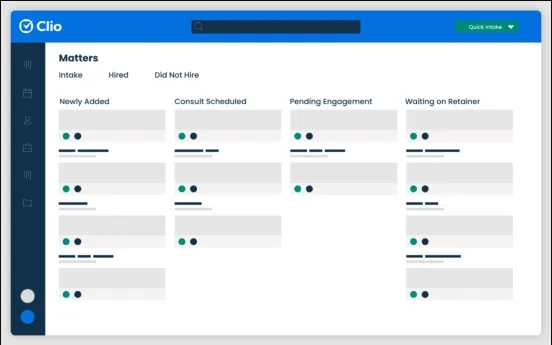
Clio Grow's intake pipeline, from Clio's Australian website.
Clio Grow sits on top of Clio Manage and moves an enquiry through stages from first contact to retainer, then hands it to the matter. Clio has had an Australian data centre since 2023, which matters to firms that want enquiry data kept onshore. Grow is included in Clio's top Australian plan and is an add-on for the others. On the Australian site it doesn't document a native Meta lead ads connection or Google offline conversions, so a firm running paid ads on Clio usually adds attribution tooling alongside it.
LEAP CRM
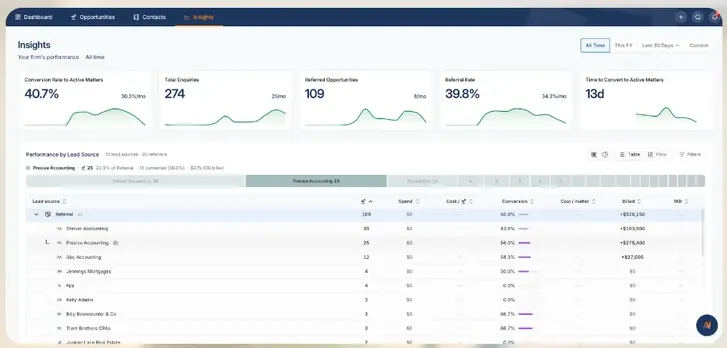
LEAP CRM's insights screen, from LEAP's Australian website.
LEAP CRM is built into LEAP and included at no extra cost for existing LEAP firms. Enquiries arrive by phone, email, web form or LawConnect, the conflict check runs on the spot, and an enquiry becomes a matter in one click. Its insights screen reports enquiries, conversion and spend by lead source. For a LEAP firm that gets most of its work from referrals and its website, that covers a lot of ground. What LEAP doesn't document is a direct connection to Meta lead ads or a way to send signed clients back to Google.
Smokeball
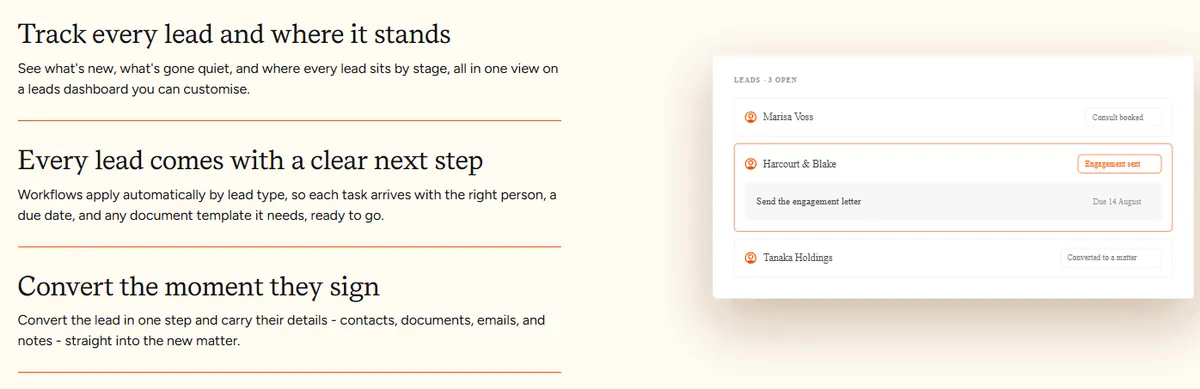
Smokeball's lead management, from Smokeball's Australian website.
Smokeball splits this into two parts. The Intake add-on ($29 per user a month on Boost, $59 on Grow, AUD ex GST) adds online intake forms, intake tracking and calendar bookings. Lead management, with workflows by lead type, conversion reporting, lost reasons and referral source insights, is only included on the top Prosper+ plan, which is priced on request. The handover is clean: a lead converts into a matter with its contacts, documents, emails and notes. Like the other practice management platforms, it doesn't document lead ads or offline conversions.
Actionstep
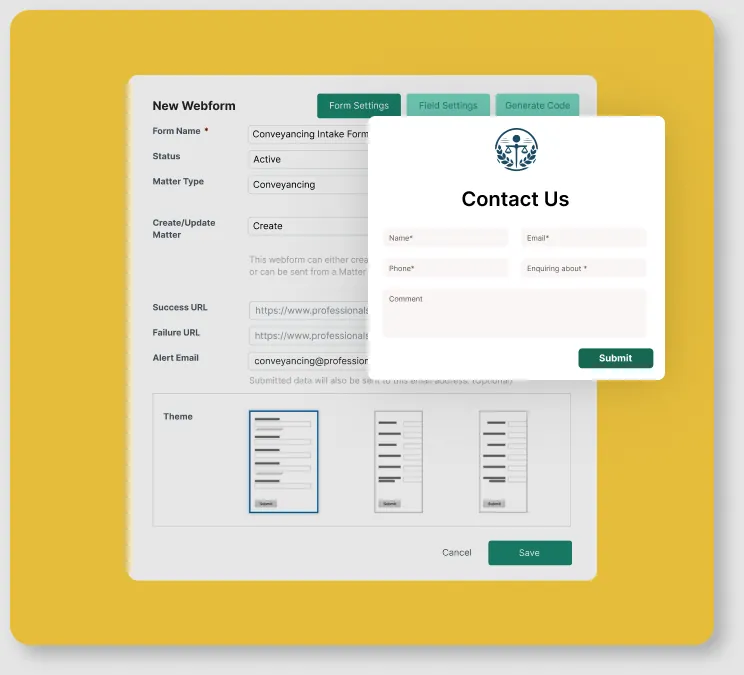
Actionstep's webform builder, from Actionstep's website.
Actionstep has been getting more attention from Australian firms, partly because it's grown by acquisition. The New Zealand-founded platform bought LawMaster in 2022 and Perth's FilePro in 2023, and it says it's now used by more than 5,000 firms. It's aimed at mid-size firms that want heavily customised workflows. Its webforms capture enquiries from your website, alert the right person by email, and convert into a matter with the details in the right fields. Its marketing module tracks campaigns, budgets and referral sources, and compares income against marketing cost for each one. Firms can choose to host their data in Australia or New Zealand. Pricing is per user plus implementation fees, and isn't published. Actionstep doesn't document SMS, online booking, Meta lead ads or Google offline conversions, so for an advertising firm it plays the same role as LEAP or Smokeball: strong on the matter, with ad intake handled elsewhere.
RedView

RedView on mobile, from LEAP's integrations page.
RedView is the one we see most often in firms that already have a practice management system they're happy with. It's an Australian legal CRM, built by Red Rain since 2007, that sits on top of the system you already use instead of replacing it. It connects with LEAP, Smokeball, Actionstep, PracticeEvolve, Affinity and Aderant, among others, and draws on the client, matter and financial data already in them.
It covers two jobs. The first is enquiries: capturing them from web forms through its API and from Outlook, reminding staff to follow up, email templates for fee estimates, meeting booking, and a pipeline view. The second is business development: marketing lists built from your practice management contacts, events and campaigns, and referrer management that shows which referrers send work and what it's worth. Its reporting covers revenue by enquiry source, and conversion and response times by staff member. Most firms never get reporting like that out of their practice management system alone. On Smokeball, for example, it checks for duplicates and converts an enquiry into a matter with the enquiry history attached.
RedView is strongest for referral-led and relationship-led firms that want proper business development reporting without moving off their existing system. It doesn't document Meta lead ads, Google offline conversions or texting, and it doesn't publish pricing, so a firm running paid ads at volume would still need the attribution side handled separately.
Lawmatics
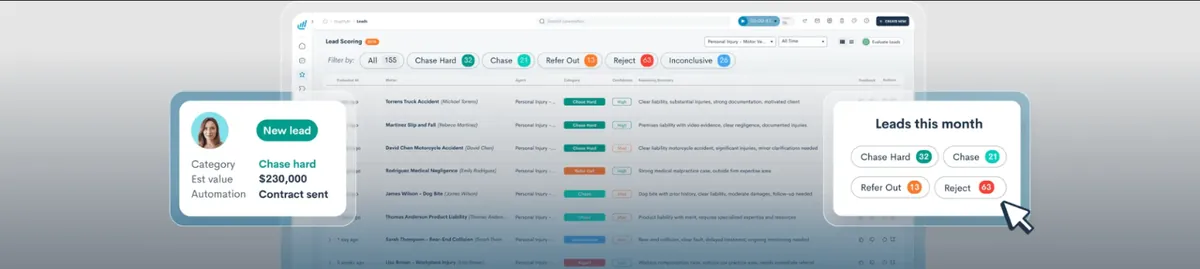
Lawmatics' lead scoring screen, from Lawmatics' website.
Lawmatics is the most marketing-focused of the legal-specific CRMs. It has intake forms, automated follow-up, booking, texting, and source and UTM reporting, and its newer lead scoring sorts enquiries by how hard to chase them. It's built for US firms first, doesn't say where data is hosted, and no longer publishes its prices. Google conversions go back through Zapier or webhooks rather than natively.
GoHighLevel
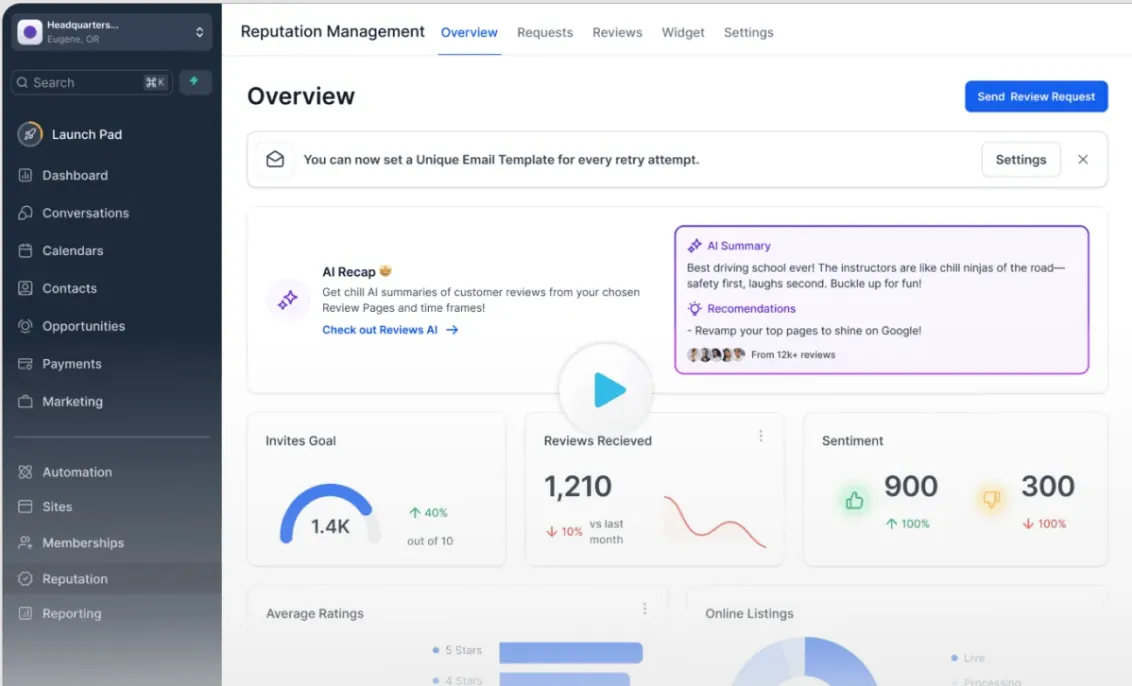
GoHighLevel's dashboard, from GoHighLevel's website.
GoHighLevel is a general marketing CRM used by a lot of agencies, including us. It connects natively to Meta lead ads, texts from Australian numbers, handles booking and reminders, and sends offline conversions to Google. It also runs review requests, which ties into getting more Google reviews. It isn't legal software, so it runs beside your practice management system. Its weaknesses are covered further down.
Which CRM suits which kind of firm?
The decision comes down to how many enquiries you get and whether you advertise, far more than which features you need.
A firm signing a few new matters a month from referrals doesn't need an intake CRM. The intake module in Smokeball, Clio or LEAP will hold the enquiries, and the principal can see everything at a glance.
A firm spending several thousand dollars a month on Google Ads or Facebook ads needs to know which campaigns produce signed clients, needs leads called in minutes, and needs the follow-up to run itself. That firm needs a separate intake CRM with native ad connections, sitting beside the practice management system, with a clear handover at the retainer.
A commercial or litigation firm that wins matters through relationships with referrers, in-house counsel and accountants is buying something different again. RedView, Nexl, Salesforce or Dynamics track relationships and referral sources, and none of them are built for ad intake.
Where is your client data stored?
Ask every vendor directly, and get the answer in writing. Enquiry data from a law firm can include health details, family circumstances and criminal matters, and your clients will assume it's handled carefully.
Clio announced an Australian data centre for Manage and Grow in 2023. The Australian practice management platforms are Australian companies, though not all of them publish where data is hosted. GoHighLevel doesn't publish Australian data residency; its Australian compliance FAQ says data is "backed up daily to the local region", and Australian users are still asking for Australian hosting on its ideas board. For a firm that collects only contact details and a few screening answers in the CRM, that may be acceptable. For a firm that wants sensitive matter details in the CRM, it probably isn't.
The practical rule is to keep the intake CRM light. Collect what you need to call, qualify and attribute the lead, and keep the detailed facts for the call and the practice management system. Our guide to what a law firm intake form should include covers which questions belong where.
How can AI keep a law firm CRM accurate?
By doing the checking that people don't have time for. A CRM is most valuable when every contact is segmented correctly: tagged by practice area, matter type, stage, source and outcome. Over time those tags drift out of date, because keeping them right depends on a lot of automation or a lot of disciplined intake work, and usually both.
At PixelRush we connect AI to our CRM, our financial systems and our client reporting, and use it to keep the CRM accurate. It looks across those systems and flags contacts that are tagged wrongly, leads with no outcome, and records that don't match what's been invoiced. So when we run a campaign or send an email to a segment, we know the people in it are the right people.
So ask any CRM vendor whether their system has an open API, or an MCP connection that AI tools can use directly. A CRM that AI can read and update can be checked against your case management, accounting and ad platforms continuously instead of once a quarter when someone finds the time. A CRM that's closed off can only ever be as accurate as the last person who updated it.
What does PixelRush use, and where does it fall short?
We use GoHighLevel for the firms we work with, running beside their practice management system. It connects natively to Meta lead ads, sends and receives texts from Australian numbers, handles booking and reminders, and creates offline conversions for Google. Leads flow into the firm's tracker and into PixelRush HQ, where we see which ad produced each lead and later each signed client.
It has weaknesses, and you should know them before you choose it:
- It isn't legal software. No conflicts, trust accounting or matter management. You still need LEAP, Smokeball, Clio or similar.
- No published Australian data residency. Covered above.
- Usage costs add up. Texts, calls, email and some automation actions are charged from a wallet on top of the subscription.
- It's easy to build automations that misfire. Texting people who've already booked is the classic mistake. Every workflow needs a stop condition and testing on go-live and again a week later.
- Webhook leads carry only what the page sends. Landing page attribution needs a script.
- Its native survey forms are clunky for anything beyond a few questions.
We keep the setup simple for the firm's team, because clients aren't GoHighLevel users and shouldn't have to become one. They see alerts, a lead tracker and a booking calendar.
How do you test whether your CRM is working?
Run three checks this week.
If the form takes more than five minutes to produce a call, if half your leads have no source recorded, or if your contact rate is under 50%, the CRM (or the process around it) is costing you clients before your marketing has a chance. Our growth system is how we set up the ads, the CRM and the intake together for firms that want it done for them.
Want us to implement these strategies for you?
Book a free strategy call and let's discuss how we can grow your business.
Book Your Free CallContinue reading
More on Law Firm Marketing
How Do Law Firms Get More Google Reviews? (Without Breaking the Rules)
Most of the advice that ranks for this question tells lawyers to ask friends, reward staff or only ask the happy clients, and all three break Google's policy or Australian consumer law. How many reviews an Australian law firm actually needs, when to ask by practice area, the SMS and in-person scripts, how to work through past clients, the Queensland injury rules, the replies that keep you inside confidentiality, and a 30-day review system.
What Should a Law Firm Client Intake Form Include? (And the Questions Costing You Clients)
Most intake form templates are US checklists with 20 fields and no thought about which questions belong on the form and which belong on the call. What an Australian law firm's enquiry form should ask, how many questions to use, the screening questions by practice area, what Meta won't let you ask, the conflict and deadline questions, the privacy and consent wording, and what the call record should capture.
How Do Law Firms Track Marketing ROI? (Why Your Dashboard Is Probably Wrong)
Cost per lead tells you almost nothing about whether a law firm's marketing makes money. How to follow every enquiry from the ad to the signed matter, the difference between ROI, ROAS and cost per signed client, how to value an injury matter that won't pay for two years, two real worked examples, why Google Ads dashboards overstate results, and how to send signed clients back to Google and Meta.
Does Video Marketing Work for Law Firms? (What Actually Signs Clients in Australia)
Video works for law firms when it's paid, built on a message that has already won as an image ad, and tracked to signed clients. Organic YouTube is the slow route. Which kinds of video work and where, what Australian lawyers can and can't say on camera, the six-beat script structure, hooks that pass Meta's policies, how to record a batch, and the numbers that tell you it's working.