





Most conversion rate advice is written by people who sell landing page software. It reads well, it is rarely wrong, and it almost never tells you which change to make first. That matters, because a business running Google Ads or Meta Ads to a page that converts at 3% is paying more than double per enquiry than the same business would at 7%, and the fix is usually four or five specific changes rather than a redesign.
This article is the order we make those changes in. It comes from the landing pages we have built and rebuilt for law firms, accountants and local service businesses over the last decade, the ones we wrote about in 7 lessons from optimising 400+ Google Ads landing pages, and from the accounts we still manage today. Where a figure comes from someone else's research, I say so. Where it is our own observation, I say that too, and I will tell you where our sample is thin.
If you only read one section, read the two on the first screen and on where your proof sits. Between them they account for most of the difference between a page that converts and a page that looks nice.
Key Takeaways
- The first screen decides most outcomes. If a visitor cannot tell what you do, who it is for and what to do next without scrolling, the rest of the page rarely gets a chance.
- Proof belongs at the point of decision. We have watched a page's conversion rate fall after its testimonials were pushed below the fold. Reviews, ratings and one strong testimonial should sit beside the form or the button, with the full review section further down.
- Put the form in the first screen, even if the designer hates it. On paid traffic this single change has produced the biggest single lifts we have seen.
- One page, one action. Every extra link, menu item and secondary offer is a place for a warm visitor to leak out.
- Match the page to the ad. The headline the visitor clicked should be the headline they land on. Mismatch is the most common reason a good campaign underperforms.
- Fewer fields converts more, but qualifying fields convert better. Ask for what you need to have a useful first conversation, and use a two-step form when the answer is more than three fields.
- Replace stock photos with real people. We have seen conversion rates double from this change alone, with photos taken on a phone.
- Speed and mobile decide more than design does. Roughly 83% of landing page visits are mobile, and conversion drops measurably for every extra second of load.
- Measure before you change anything. A conversion rate you cannot verify against calls, form fills and booked appointments is a guess, and most of the numbers people quote to us are guesses.
What is a good website conversion rate?
Before you change anything you need to know whether your page has a problem, and that depends on the traffic source and the industry more than most benchmark articles admit.
Across the Google Ads accounts we manage, landing page conversion rates run from 1.2% to 21.1%, with most local service businesses sitting between 9% and 17% on non-brand search with verified call and form tracking. That range is from our own Google Ads cost data, and it is the most useful starting point I can give an Australian service business.
Two external references are worth having beside it. Unbounce's 2024 Conversion Benchmark Report, built from 57 million conversions across 41,000 landing pages, puts the overall median at 6.6%. WordStream's 2026 Google Ads benchmarks, from 13,474 US search campaigns, put the average search conversion rate for attorneys and legal services at 5.55%.
| Traffic source or industry | Conversion rate | Source |
|---|---|---|
| All landing pages, median | 6.6% | Unbounce 2024 |
| Email traffic to landing pages | 19.3% | Unbounce 2024 |
| Paid social traffic to landing pages | 12.0% | Unbounce 2024 |
| Paid search traffic to landing pages | 10.9% | Unbounce 2024 |
| Attorneys and legal services (search) | 5.55% | WordStream 2026 |
| Business services (search) | 4.85% | WordStream 2026 |
| Finance and insurance (search) | 2.64% | WordStream 2026 |
| Home services (search) | 8.05% | WordStream 2026 |
| Dentists (search) | 10.67% | WordStream 2026 |
| Local service businesses, our accounts (non-brand search) | 9% to 17% | PixelRush managed accounts |
| Full range across our accounts | 1.2% to 21.1% | PixelRush managed accounts |
Read the table with two caveats. The Unbounce figures are landing page conversions of any kind, including newsletter sign-ups, so they run higher than a lead form for a $10,000 legal matter. The WordStream figures are US search campaigns sending traffic to whatever page the advertiser chose, including homepages, which drags the average down. A purpose-built page for a high-intent service should sit well above both.
Key Point
If you are running paid search to a dedicated page and converting under 5%, the page is the problem, not the traffic. Fix it before you touch bids or budget. Doubling the conversion rate halves your cost per enquiry without spending another dollar in the auction.
The other thing to check first is whether your number is real. We have inherited accounts reporting 50% conversion rates because a page view was counted as a conversion, and accounts reporting 1% because phone calls, which were 60% of their enquiries, were never tracked. Our article on the costly mistakes businesses make with Google Ads covers what a tracking setup needs to include before any of these numbers can be trusted.
1. Fix the first screen before anything else
Above the fold is whatever a visitor sees before they scroll. On a phone that is a very small space, and on paid traffic it is where the majority of visitors decide whether to stay.
I have seen well-designed websites where hardly anyone scrolls beneath the fold. That was not a failure. Visitors found what they needed the moment the page loaded and did not need to go further. The opposite is far more common: a full-width slider of stock photos, a headline like "Welcome to our website" or "We love our customers", and no indication of what the business does or who it helps.
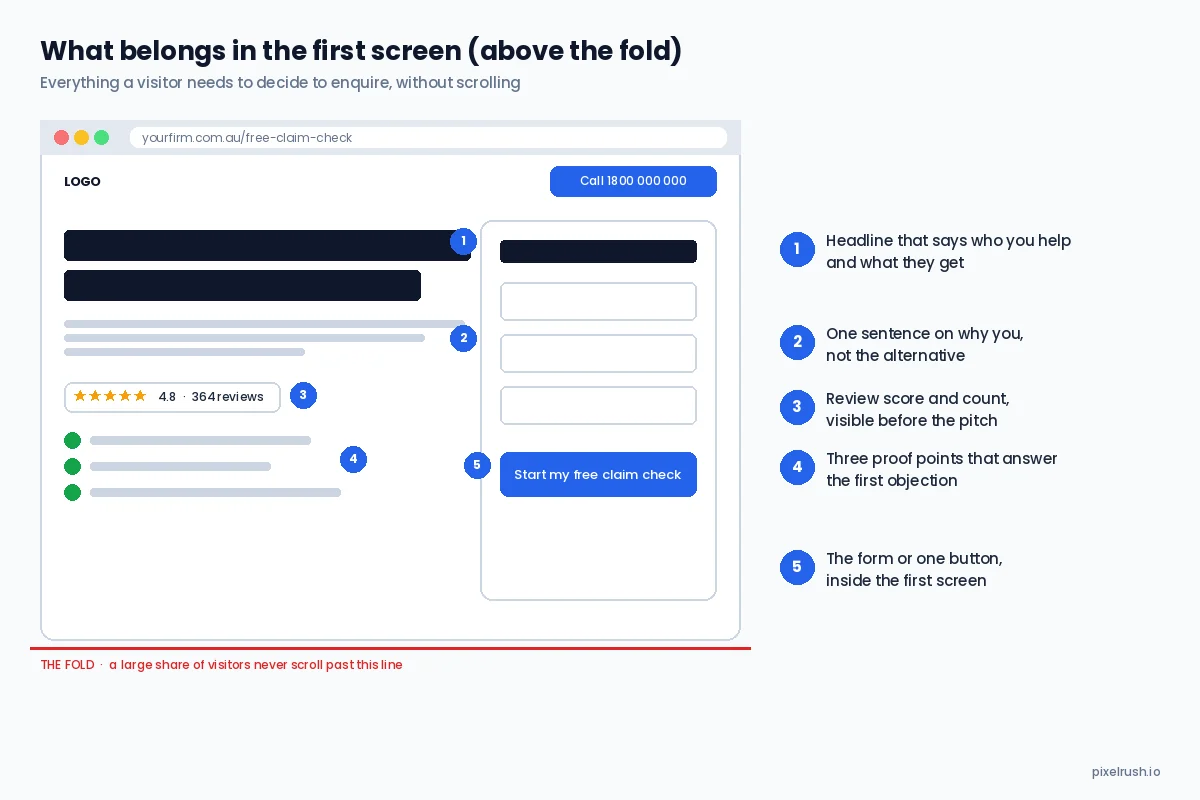
The five things a visitor needs in the first screen to decide to enquire. Everything else can go below.
Here is what belongs in that first screen, in order of importance.
| Element | What it does | Common mistake |
|---|---|---|
| Headline | Says who you help and what they get | Company name, slogan or "welcome" |
| Supporting line | One sentence on why you rather than the alternative | A paragraph about your history |
| Review rating and count | Borrowed trust before the pitch | Hidden on a reviews page nobody visits |
| Three proof points | Answer the first objection (cost, risk, time) | Feature list |
| The form or one button | Makes the next step obvious | CTA below the fold, or three competing CTAs |
The Sydney criminal firm's page below does all five. Headline naming the practice area and city, the lawyers' faces, a 4.9 Google rating with the review count, and a form whose first real question is "what happened?", all visible without scrolling on desktop and stacked in the same order on mobile. It scored 19 of 20 in our landing page teardown.
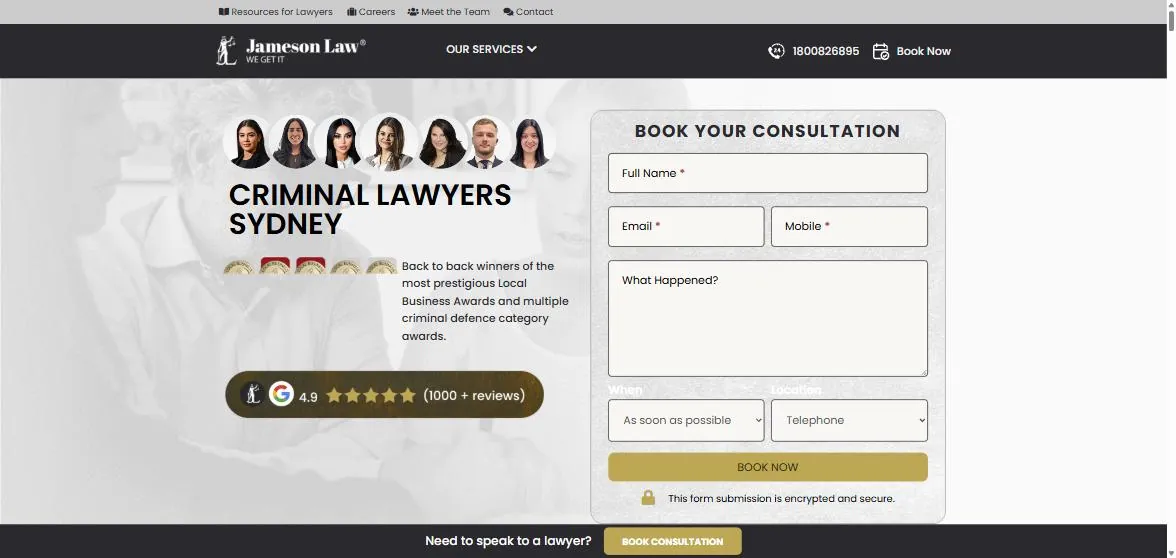
Everything needed to decide is in the first screen: the practice area, the people, the rating and the form.
Test it on your own page with a five-second rule. Load it on a phone, look at it for five seconds, close it, and ask someone who has never seen it what the business does and what they were supposed to do next. If either answer is vague, start here.
2. Put your proof where the decision is being made
Testimonials work. Where they sit on the page gets far less attention than whether you have them, and position is what determines whether they get seen at all.
We have seen this directly. A page that converted well had its testimonials moved below the fold during a redesign, because the new hero layout looked cleaner without them. Conversion rate dropped. Nothing else on the page had changed. The proof was still there, but the visitors who were deciding whether to fill in the form were deciding before they reached it.
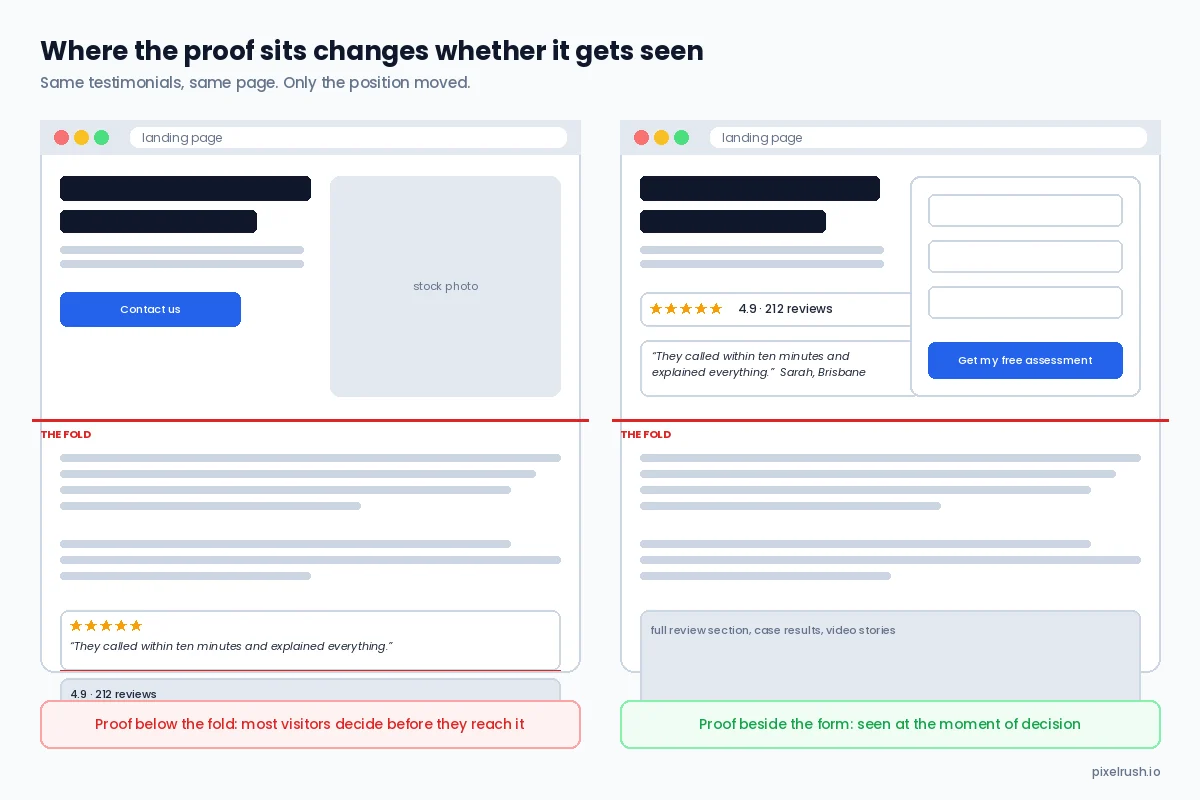
Same testimonials, same page. Only the position moved, and the page on the right is the one that converts.
The rule I give clients now is that proof goes as high as you can get it, and the strongest single piece of proof sits next to the form. That usually means:
- A review score and count (Google, Trustpilot, Product Review) in or immediately under the hero
- One short, specific testimonial or case result beside the form or button
- Trust bars with your three strongest proof points directly under the first screen
- The full testimonial section, video stories and case studies further down for the people who need more
Written testimonials also vary enormously in how much work they do. "Great service, highly recommend" tells a visitor nothing. A testimonial that names the problem, the outcome and the detail that mattered does the selling for you.
| Weak testimonial | Strong testimonial | Why it works |
|---|---|---|
| "Great to deal with, highly recommend." | "They called me back within ten minutes on a Sunday and had my claim lodged by Tuesday." | Names the fear (being ignored) and the specific outcome |
| "Very professional team." | "We had been told we had no case. Eighteen months later the settlement paid off our mortgage." | Overcomes the objection the visitor arrived with |
| "Five stars!" | "Our first tax return with them found $14,000 our old accountant had missed." | A number, a comparison and a result |
Video testimonials are the version of this that most service businesses still have not done, and in our experience a single 90-second video from a real client outperforms an entire page of written reviews. We covered how personal injury firms use them in our guide to personal injury landing pages for PPC traffic.
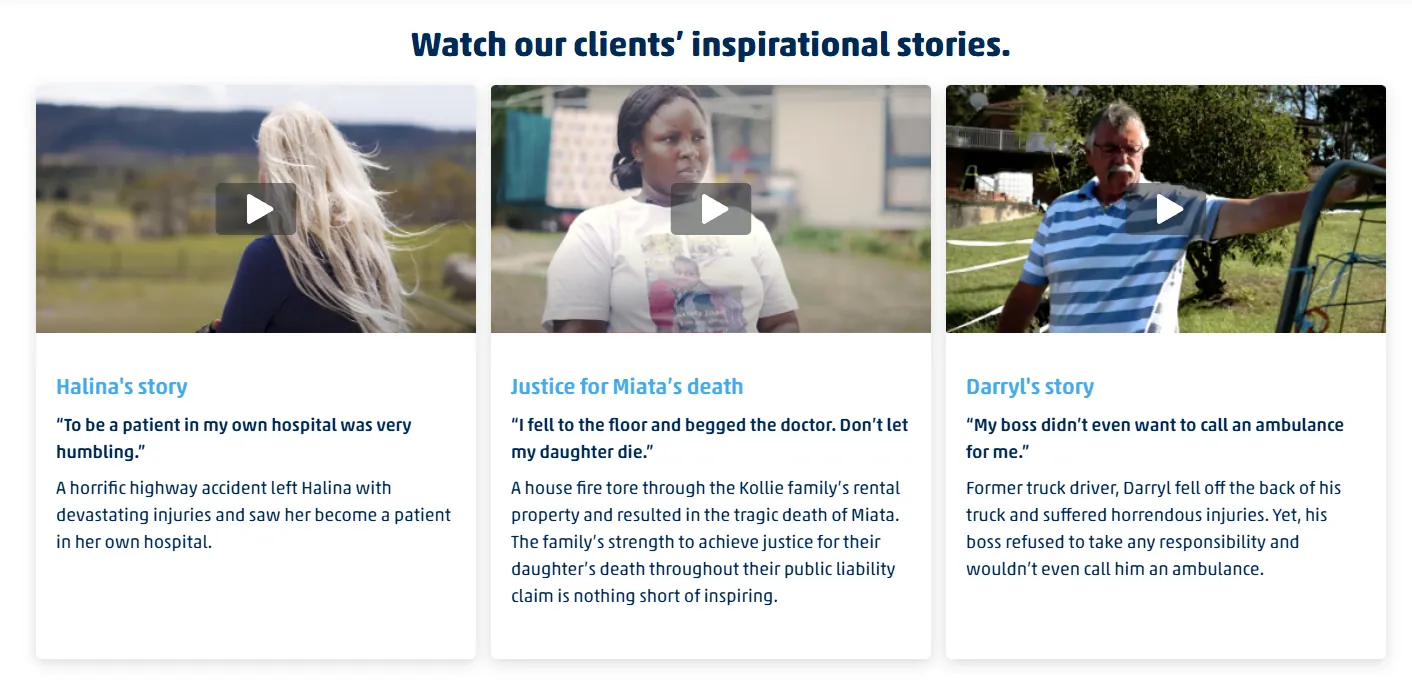
Three real clients, three thumbnails, three one-line quotes. This section earns its place high on the page.
Expert Tip
Make it easy for clients to give you a usable testimonial. When a client says something specific on a call, write it up in their words, send it to them for approval, and ask if you can use it with their first name and suburb. You will get a better testimonial than a blank review request ever produces.
3. Put the form in the first screen
This one annoys designers, so I am going to say it anyway. Having the form very high on the page, inside the first screen, is one of the best ways to capture conversions on paid traffic, and it has produced some of the largest single lifts we have measured.
The objection is always the same: it looks pushy, it crowds the hero, the page looks better with a big image. All true, and none of it matters if the visitor arrived from a search for "no win no fee lawyer Brisbane" with their phone in one hand and is ready to act right now. That visitor does not want to scroll past your values to find the form.
If a full form does not fit, the answer is a two-step form. The first screen asks one easy question, and the contact details come on the second step. The form on the a Melbourne litigation firm page below takes the full-form approach with four fields beside the headline. The personal injury page under it takes the two-step approach, with a single question in the hero.
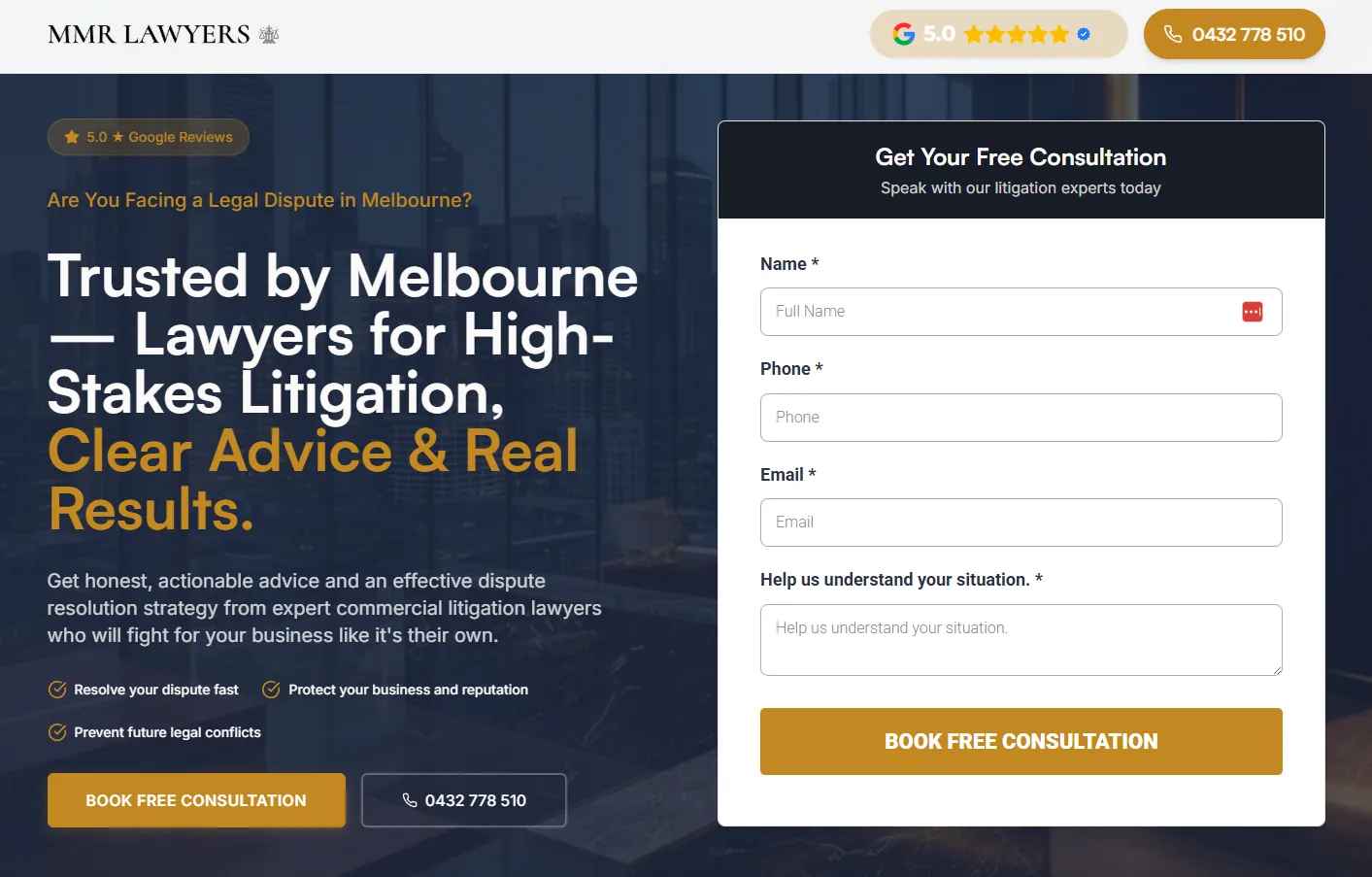
Four fields, one button, rating in the header. The form is the hero.
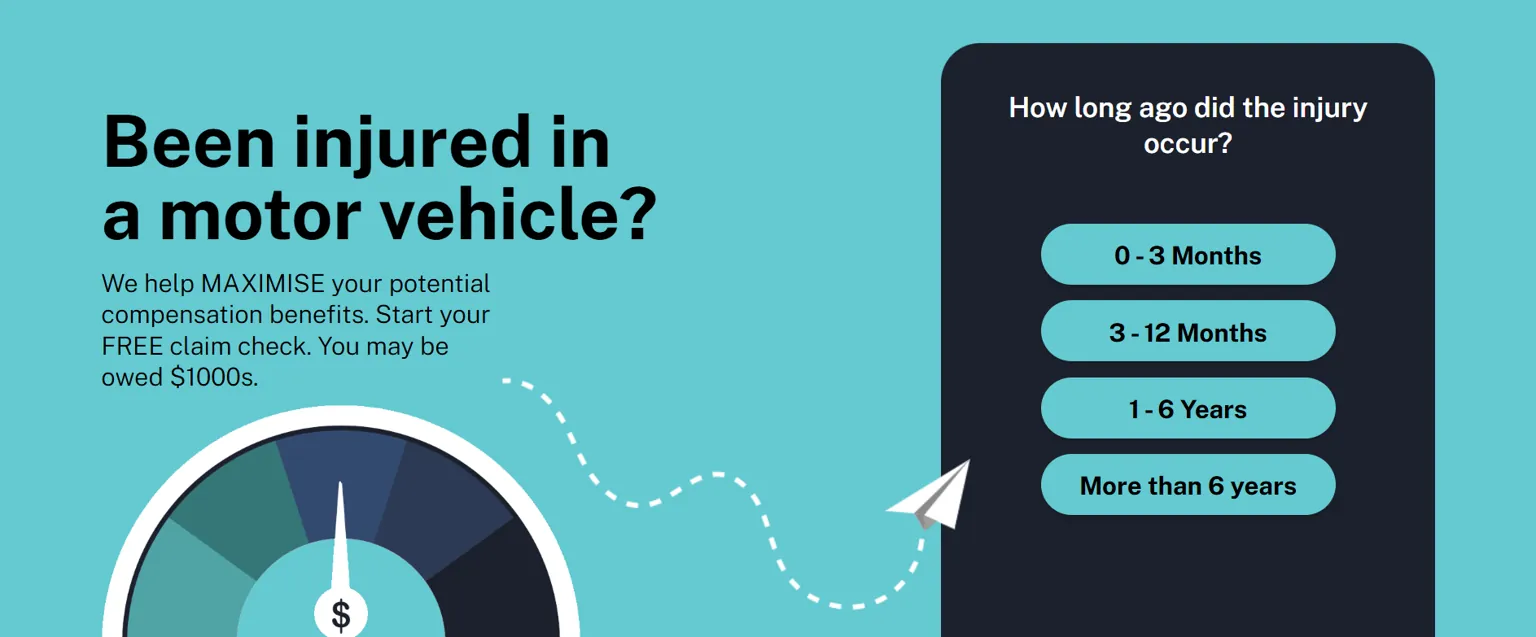
A two-step form. One easy question in the first screen, contact details on the next step.
In our tests across law firm and accounting pages, the two-step version usually wins on mobile, and it has a second benefit covered in section 6: the first question qualifies the lead.
4. Write a headline that says who and what
David Ogilvy's line that five times as many people read the headline as the body copy has been quoted in every conversion article ever written, and it is still the reason most pages fail. If the headline is your business name, a slogan or an adjective, the visitor has to do the work of figuring out whether the page is for them. Most will not.
A working headline names the person and the result. A time frame, a number or a guarantee makes it stronger. The formula is simple enough to put in a table.
| Formula | Weak version | Working version |
|---|---|---|
| Who + what they get | "Melbourne's trusted accountants" | "Tax returns for tradies, lodged in 48 hours" |
| Problem + resolution | "Personal injury experts" | "Injured at work? Find out in 60 seconds if you can claim" |
| Outcome + proof | "Quality plumbing services" | "Same-day plumber, 4.9 stars from 1,200 Melbourne jobs" |
| Comparison | "Compensation lawyers" | "Compensation claims. Done differently." (with the proof underneath) |
One warning on the "who". If your page is for personal injury clients and the headline says "for injured workers", a car accident victim will assume it is not for them. Either write a page per claim type, which is what we recommend in our personal injury marketing by claim type guide, or write the headline broad enough to cover the traffic you are actually sending.
5. One page, one action
A landing page has one job. A homepage has twenty. Send paid traffic to the homepage and it almost always converts worse than a dedicated page for that reason alone.
Every extra link is a place for a warm visitor to leave. Navigation menus, social icons in the header, "learn more" links to other services, a blog feed in the sidebar. HubSpot's own testing years ago found pages without navigation links converted up to 28% better, and our experience matches it. The case study in our 400 landing pages article took a cluttered psychology practice page from 3% to 8% conversion, and leads from 30 to 60 a month, largely by removing everything that competed with the booking form.

One offer, one button, nothing else to click. The page cannot be misunderstood.
The practical checklist:
- Remove the main navigation, or reduce it to a logo and a phone number
- Remove social media icons from the header (put them in the footer if you must)
- One primary call to action, repeated down the page, with the same wording each time
- If a phone number is a conversion, make it click-to-call and track it
- No links to other services. If the visitor is on the wrong page, the ad was wrong, not the page
If you must offer more than one choice, such as three service tiers, mark one as the recommended option. People take the choice that has been made for them.
6. Ask for less, but ask the right things
Every field on a form costs you completions. The standard advice is therefore to ask for as little as possible, usually name, phone and email, and for a lot of businesses that is right.
For service businesses that get junk leads, and every law firm and accounting practice does, it is only half right. A three-field form maximises submissions and also maximises the number of people your team calls back who were never a fit. We wrote about the cost of that in why your law firm's Google Ads are producing junk leads, and the answer is a form that asks one or two qualifying questions before it asks for contact details.
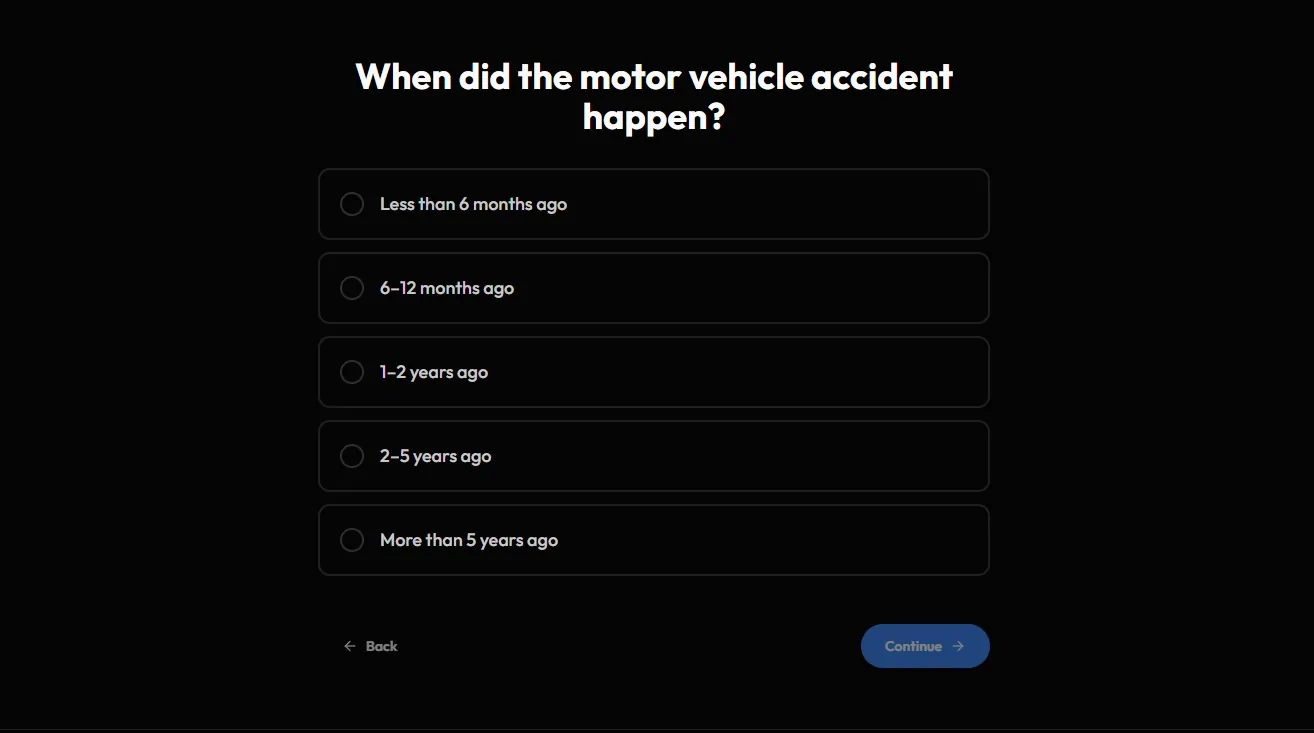
The qualifying question sits first. A visitor whose accident was seven years ago learns immediately that there may be a limitation issue, and the firm's intake team does not spend twenty minutes finding out.
| Form approach | Submissions | Lead quality | Best for |
|---|---|---|---|
| Three fields (name, phone, email) | Highest | Lowest | Low-ticket, high-volume offers |
| Three fields plus one qualifying question | Slightly lower | Much higher | Most service businesses |
| Two-step: qualifying question first, contact second | Similar to three fields | Highest | Law, accounting, high-ticket services |
| Long single-page form (6+ fields) | Lowest | High but with heavy drop-off | Almost nobody |
The two-step form works because the first question is easy and commits the visitor. By the time they see the contact fields they have already answered something about their situation, and abandonment is far lower than a long form presented all at once.
7. Make the page match the ad
If the ad says "free compensation claim check" and the page says "Welcome to Smith & Partners Lawyers", you have a mismatch, and mismatch is the most common reason a well-built campaign underperforms.
Google also measures this. Landing page experience is a component of Quality Score, and a page that does not reflect the ad pays more per click on top of converting worse. We covered the mechanics in our article on structuring PPC campaigns that convert.
| Ad promise | Page should lead with | Page should not lead with |
|---|---|---|
| "Free claim check in 60 seconds" | The claim check form | Firm history and values |
| "Same-day tax return" | Same-day promise and a booking form | A menu of every accounting service |
| "No win no fee car accident lawyers" | Car accident claims, no win no fee, in the headline | Generic personal injury copy |
| "Book a free consultation" | The booking form or calendar | A contact page with an address |
The simplest way to check is to put the ad and the page side by side. The headline of the ad and the headline of the page should be recognisably the same promise, in the same words. If your ads use dynamic keyword insertion, the page headline should be able to change with them.
The same logic runs one step further back. The cheapest conversion rate improvement on paid search happens before the click, in who you let through. An exact match search for "car accident lawyer brisbane" converts at a multiple of a broad match query that merely contains the word "lawyer", on the same page, because the first visitor already knows what they want. If the page is sound and the conversion rate is still low, look at the search terms report and the match types before you touch the page again. Our guide to structuring PPC campaigns that convert and the Quality Score guide cover that side in detail.
8. Replace stock photos with real people
Stock photography is the same handshake, the same headset, the same smiling woman with a laptop that your three nearest competitors are using. Visitors have learned to see straight through it.
I have watched conversion rates double from swapping stock images for photos of the actual team, and they did not need a professional photographer. A colleague with a recent phone, decent light and ten minutes produced images that did more for the page than any licensed stock library. A photo of a real solicitor, a real office or a real client (with permission) does something stock cannot: it makes the business feel like a place with people in it.
Video does the same work harder. A 60-second piece to camera from the principal, sitting beside the form, tells the visitor who they will be dealing with before they have spoken to anyone. On the pages we build for firms whose principals are willing to be on camera, that video is usually the most-watched element on the page.
9. Make the button look like a button, and say what happens next
Small things here, but they are cheap to fix.
- A button, not a text link. Large, high contrast, one brand colour reserved for calls to action and used nowhere else on the page.
- Copy that describes the outcome, not the mechanism. "Start my free claim check" beats "Submit". "Get my quote" beats "Send".
- The same button copy every time it appears on the page.
- Under the button, one line that removes the risk: "No obligation. We reply within one business hour."
| Button copy | Problem | Better |
|---|---|---|
| Submit | Describes the form, not the outcome | Check my eligibility |
| Learn more | Sends the visitor away from the conversion | See if you qualify |
| Contact us | Vague, sounds like effort | Get a call back today |
| Download | No value stated | Get the free checklist |
10. Speed and mobile are not optional
Unbounce's benchmark report found 83% of landing page visits happen on mobile, while desktop still converts about 8% better. Read together, those two figures mean the majority of your visitors are on the device where your page performs worst.
Speed compounds it. Portent's research put the drop at around 4.4% in conversion rate for every additional second of load time in the first five seconds, and Google's own guidance has recommended a mobile load under three seconds for years. Neither figure is precise for your page, but the direction is not in dispute.
The checks that matter, in order:
11. Write at the level people actually read
This one surprised me when I first saw the data. Unbounce's analysis found pages written at a Year 5 to Year 7 reading level converted at 11.1%, against 5.3% for pages written at a professional level. Words with three or more syllables correlated negatively with conversion, and so did word count and reading time.
For lawyers and accountants this is uncomfortable. The instinct is to write the way the profession speaks. The visitor is a person with a problem, reading on a phone, often stressed, and they want to know whether you can help and what happens next. "We will assess your eligibility for statutory compensation under the relevant scheme" converts worse than "Find out in 60 seconds if you can claim".
Our guide to writing high-converting legal website copy goes through this in detail, including the "you" versus "we" test: if your copy contains the word "our" more often than "you", it is about the firm rather than the client, and it will read that way.
12. Answer the objection before the form
Every visitor arrives with a reason not to act. For a law firm it is usually cost and whether they have a case. For an accountant it is the hassle of switching. For a tradie it is whether anyone will actually turn up.
The pages that convert answer the objection in the first screen, without being asked. That is what "Available now", "Book a free consult" and the review count are doing on the Sydney page above. It is why "No obligation" belongs under every button and why a guarantee, where you can offer one, belongs in the hero rather than in the fine print.
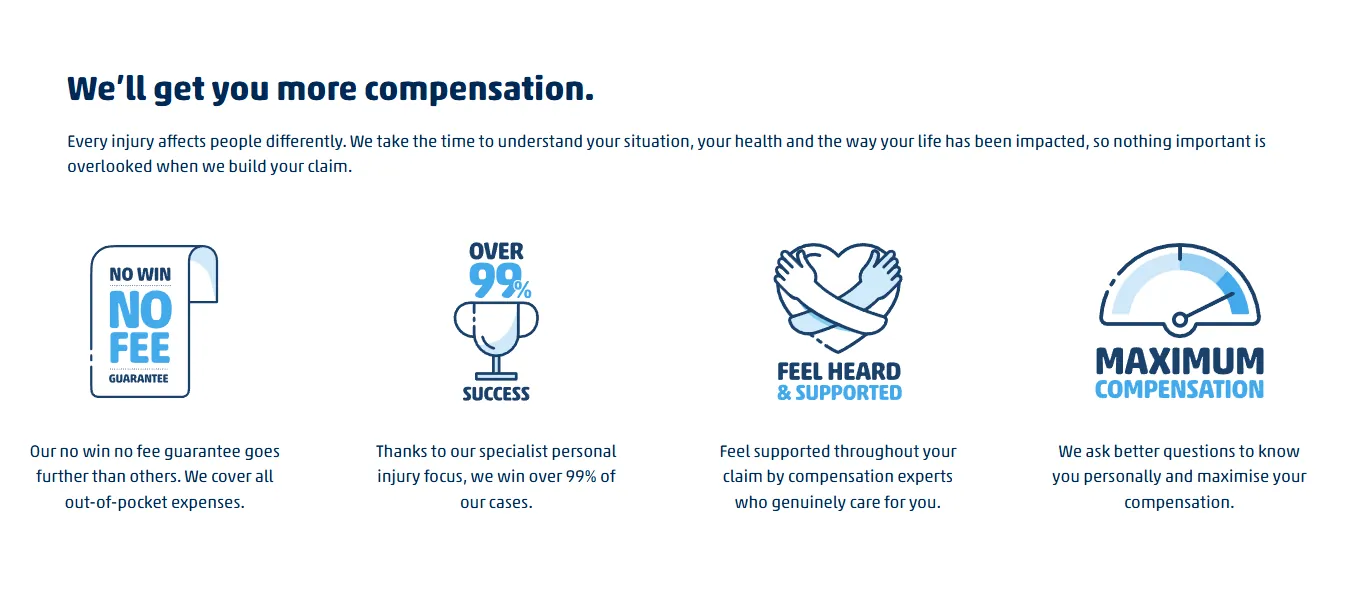
Four objections, four answers, one row, directly under the first screen.
| Visitor's unspoken objection | What the page should say |
|---|---|
| "This will cost me money I don't have" | No win no fee, fixed fee, free first consultation |
| "I probably don't have a case" | Free claim check, "find out in 60 seconds" |
| "They won't call me back" | "We reply within one business hour", real response time stat |
| "They're too big to care about me" | Named solicitor, photo, "you deal with the same person throughout" |
| "How do I know they're any good?" | Rating, review count, case results, years and matters |
13. Respond fast, or the conversion does not count
A form submission is not a client. It is a person who has raised their hand, and how quickly you respond decides whether they become a client or ring the next firm on the results page. Our own data on lead response time in personal injury shows contact rates falling sharply after the first few minutes, and it is the reason we treat the response process as part of the landing page rather than something that happens afterwards.
Three things to build in:
- An instant SMS and email confirmation that tells the person what happens next and when
- A call-back within minutes during business hours, and a clear statement on the page of when they will hear from you if they enquire after hours
- A thank-you page that keeps them engaged: a short video from the principal, a checklist of what to have ready, a link to relevant case results
The thank-you page is also where your conversion tracking should fire, which brings us to the last two points.
14. Track it properly before you test anything
You cannot improve a conversion rate you cannot measure, and most of the conversion rates people quote to us are wrong. Phone calls untracked. Form submissions counted twice. Page views counted as leads. A thank-you page that fires on refresh.
At minimum, before you change anything on the page:
- Form submissions tracked on the thank-you page, not the button click
- Phone calls tracked through call tracking or Google's call reporting, with a minimum duration so a wrong number does not count
- Enquiries pushed into a CRM with their source recorded, so you can see which leads became clients
That last step is the one that separates a conversion rate from a revenue number. A page that produces 40 enquiries at a 12% conversion rate and no clients is worse than a page producing 20 enquiries at 6% and four clients. We built our whole closed loop growth system around that distinction, and it changes which page wins almost every time.
The metrics worth watching, in the order they connect to money:
| Metric | What it tells you | What it cannot tell you |
|---|---|---|
| Click-through rate | Whether the ad matches the search | Anything about the page |
| Conversion rate | Whether the page matches the visitor | Whether the enquiries were any good |
| Cost per enquiry | What a lead costs today | What a client costs |
| Enquiry to client rate | Whether the page is attracting the right people | Nothing, if you are not recording it |
| Cost per client | The number the business actually runs on | Nothing. This is the one to optimise |
Most businesses optimise the second row and never see the fourth. A change that lifts conversion rate by loosening the form or broadening the headline often lowers the enquiry to client rate at the same time, and the only way to catch it is to track the lead through to the outcome. If your reporting stops at cost per enquiry, you are optimising the wrong number.
15. Change one thing, measure, then change the next
A/B testing is the last item on this list on purpose. Most service business pages do not have enough traffic to run a statistically meaningful split test, and most of the changes above are large enough that you can see them in the numbers without one.
The approach that works with a few hundred visitors a month is sequential: make one change, leave it for two to four weeks, compare against the previous period, and keep it if it wins. Start with the highest-impact changes and work down.
If you do have the traffic, Google Ads Experiments is the cleanest way to split test a paid landing page, because it splits the same campaign's clicks between two pages rather than relying on the page tool to randomise visitors. Two rules make the result worth having. Change one thing per test, so a win can be attributed to something, and let it run until each variation has enough conversions to mean something, which for most service businesses is at least 30 to 50 per side rather than a handful over a weekend. Testing two wildly different pages against each other tells you which page won and nothing about why, which leaves you with no way to carry the lesson to the next page.
| Change | Typical impact | Effort | Do it |
|---|---|---|---|
| Form or CTA into the first screen | Very high | Low | First |
| Proof (rating, testimonial) beside the form | Very high | Low | First |
| Headline that names who and what | High | Low | First |
| Remove navigation and competing links | High | Low | Second |
| Match page headline to ad copy | High | Low | Second |
| Real photos replacing stock | High | Medium | Second |
| Two-step or qualifying form | Medium to high | Medium | Third |
| Mobile speed and layout | Medium to high | Medium | Third |
| Simpler copy, lower reading level | Medium | Medium | Third |
| Button copy and design | Low to medium | Low | Any time |
| Video from the principal | Medium | High | When you can |
| Split testing | Depends on traffic | High | Last |
Where to start on your own page
Load your landing page on your phone and go through the first screen. Can a stranger tell what you do, who it is for and what to do next? Is there a rating or a testimonial in view? Is the form or the button there, or is it two scrolls down under a hero image?
If the answer to any of those is no, you have found your first change, and it is probably worth more than everything else on this list combined. Make it, leave it for a few weeks, check the numbers against calls and form fills that you have actually verified, and then take the next one.
If you would rather have someone else do it, this is the work we do every week for law firms and accounting practices as part of our Google Ads and Meta Ads management, and you can see what the results look like in our case studies. Book a call and we will look at your page together, with your numbers rather than someone else's benchmarks.
Want us to implement these strategies for you?
Book a free strategy call and let's discuss how we can grow your business.
Book Your Free CallContinue reading
More on Web Design
7 Lessons From Optimising 400+ Google Ads Landing Pages (With the Before and Afters)
What four hundred landing page rebuilds taught us about why paid traffic does not convert, with the real pages, the before and afters, and the results: 3% to 8% conversion, 60% more direct bookings, 150% more organic conversions.
How Much Should a Small Business Spend on Marketing?
The percentage-of-revenue rule is outdated. Here is the ROI-based framework that actually drives smart marketing budgets for small businesses in Australia.
Website Cost in Australia: 2026 Pricing Guide
Your mate down the road reckons he can build you a website for $500. Meanwhile, that fancy agency wants $15,000 for what looks like the same thing. So what's the real cost?
How to Write High-Converting Legal Website Copy: A Guide for Law Firms
Your legal website looks professional. You've got the sleek design, the impressive logo, and all your credentials prominently displayed. But something's not working – your website visitors aren't turning into clients. Here's the thing: while other law firms are battling over who has the most awards or the fanciest office photos, you'll learn what makes […]